Category Archives: Product News

DPA Mobile Diagnostics: How It Works

DPA MOBILE DIAGNOSTICS: HOW IT WORKS

DPA MD is now available on the Google Play Store! Get it here: https://play.google.com/store/apps/details?id=com.dg.dpamd

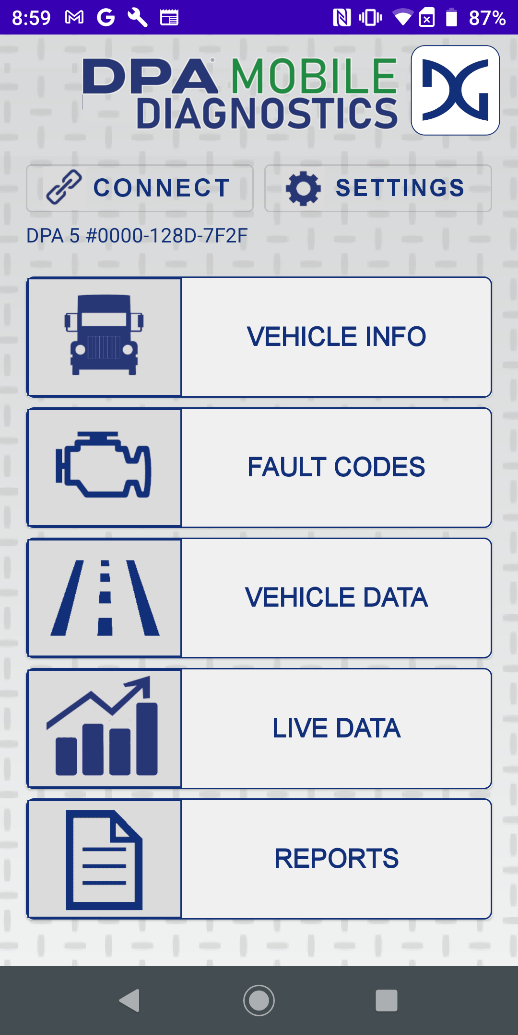
Once connected to a DG Technologies device, users will be able to look at a wide range of data, including:

– Vehicle Info, such as the VIN, odometer and engine hours.

– Fault Codes, including all J1939 published CAN data, Engine, Transmission, and ABS, allowing you to view and clear each one.

– Vehicle Data, such as fuel usage, engine hours, fuel economy and live data.

– Reports, allowing the user to email or print the data from their DPA device in an organized format.

What is DPA MD and Who is it For?

WHAT IS DPA MOBILE DIAGNOSTICS?

DPA Mobile Diagnostics (DPA MD) is DG Technologies’ heavy-duty diagnostic mobile app to read and clear fault codes, view live data, send reports and more, from your bluetooth-connected Dearborn Protocol Adapter (DPA) device. Optimized for the best user experience with the ALL NEW DPA XL. Fleet & truck maintenance has never been simpler with DPA MD.

To purchase your DPA XL, visit www.dgtech.com/shop/ and receive free ground shipping when you order!

WHO SHOULD USE DPA MD?

DPA MD is used by fleet managers, technicians, and service writers using their trusted, secure new DPA XL, or previous edition, from DG Technologies.

Get the app here: https://play.google.com/store/apps/details?id=com.dg.dpamd or on your mobile device by searching “DPA MD”.


DPA Mobile Diagnostics, Available on the Google Play Store!

DG Technologies announces the launch of our new DPA Mobile Diagnostics app for Android! The perfect heavy-duty truck app for Technicians, Service Writers and Fleet Managers. Read/clear fault codes, view live data, send reports, and more from your Bluetooth connected DPA XL. Available Now!

To download, search for DPA Mobile Diagnostics in the Google Play Store, or click here: https://play.google.com/store/apps/details?id=com.dg.dpamd


DPA XL & VSI NxGen: Announcing NEW Updates, Available Now on DG Technologies Website

DPA XL and VSI NxGen users can now download the latest software updates (version 3.02 for each) from the downloads page on the DG Technologies website. Changes for the DPA XL include firmware updates, LED light enhancements, ELM mobile app support and raw CAN message additions, among other maintenance and bug fixes. Revisions to the VSI NxGen include firmware updates, protocol support additions, raw CAN message updates, and Diag-H support, among others.

DG Technologies continues to support all of our products. To be the first to know of any changes or updates to your tools, please make sure you’re following DG Technologies on social media:

Twitter: @DGTechnologies
Facebook: @vehiclenetworksolutions
Instagram: @dg_technologies


In addition, keep an eye on our news page for further information and more company updates, news and announcements straight from DG Technologies.


Introducing the NEW DPA XL!

INTRODUCING THE ALL-NEW DPA FROM DG TECHNOLOGIES, THE DPA XL!


The ALL-NEW DPA XL is DG Technologies newest, TMC RP1210 compliant Dearborn Protocol Adapter (DPA) with current and future technologies built-in for years of shop services. It is the leading tool of choice for Diagnostics and Reprogramming of Heavy-Duty, Medium-Duty and some Light-Duty vehicles and covers over-the-road, bus, construction, agricultural, military, industrial stationary equipment and fleet vehicle segments!


New features with the DPA XL are:

  • Built and designed with the most up-to-date components and technologies for expanding product service offerings
  • SAE J2534, 05.00 API Support
  • CAN FD (2 channels) capable (future)
  • FT CAN (1 channel) capable (future)
  • RP1227 capable for Mobile Apps
  • Embedded Hardware Security Module (HSM) For Cloning Protection


Click HERE for more information and click here to BUY NOW for special introductory pricing!


New VSI NxGen Update, 3.01.01, is now available for download!

VSI NxGen automotive tool users,

The New VSI NxGen software release, 3.01.01, is now available!

This new release contains enhancements to CAN FD performance and GM’s Vehicle Intelligence Platform vehicle programming & diagnostics functions. Other enhancements, performance improvements, and bug fixes improve the user experience.

To download, please go to www.dgtech.com/downloads.

Once you have downloaded this for your VSI NxGen, an additional suite of software is also available to assist you! On your PC, go to: Start > DGTech Utilities. Here you will find:

  • Adapter Validation Tool: to verify you are properly connected to the vehicle, VSI NxGen and PC.
  • DG Data Recorder: to record 100% data on the connected channels & protocols and then review in a .csv format.
  • DG Diagnostics: to read and review all available data from the vehicle as it relates to OBDII and legislated SAE standards, including read/clear codes.

VSI NxGen documents can be found at www.dgtech.com/documents.

For the best experience, it is important to keep your products and software updated.

Thank you!


New VSI NxGen Software Release, 3.01.01, is now available!

VSI NxGen automotive tool users,

The New VSI NxGen software release, 3.01.01, is now available!

This new release contains enhancements to CAN FD performance and GM’s Vehicle Intelligence Platform vehicle programming & diagnostics functions. Other enhancements, performance improvements, and bug fixes improve the user experience.

To download, please go to www.dgtech.com/downloads.

Once you have downloaded this for your VSI NxGen, an additional suite of software is also available to assist you! On your PC, go to: Start > DGTech Utilities. Here you will find:

  • Adapter Validation Tool: to verify you are properly connected to the vehicle, VSI NxGen and PC.
  • DG Data Recorder: to record 100% data on the connected channels & protocols and then review in a .csv format.
  • DG Diagnostics: to read and review all available data from the vehicle as it relates to OBDII and legislated SAE standards, including read/clear codes.

VSI NxGen documents can be found at www.dgtech.com/documents.

For the best experience, it is important to keep your products and software updated.

Thank you!

Announcing NEW DPA 5 PRO Updates Available for Download!

Announcing NEW DPA 5 PRO Updates that are going to change your business! Version 4.01.40 is now Available for Download

The best tool value in the world just got better!

The industry is changing and your DG Technologies tools are leading the way to protect your business, your systems, your trucks and your customer assets. We have taken the newest industry specifications and CyberTech standards and packed them inside your DPA 5 PRO to further improve the most secure and trusted tool in the trucking industry today.

DG Technologies has released version 4.01.40 software for the DPA 5 PRO Vehicle Diagnostic Adapter.  This includes updated DPA firmware, an updated DG Utilities install, RP1210 & Native driver changes, updated security protection from CyberTech, and efficiency enhancements.

Keep your tools secure and operating at peak performance by going to our downloads page at https://www.dgtech.com/downloads/ and download version 4.01.40 for the DPA 5 PRO.

To view and/or download individual product documents, head over to our documents page at https://www.dgtech.com/documents/.

To purchase a new DPA 5 PRO today, visit the DG Technologies webstore at https://www.dgtech.com/store/dpa-5-pro.html.

All of us at DG Technologies appreciate your business and we are working hard every day to improve our products and make your job easier.  Our goal is to provide the most rugged, reliable, and CyberTech secure tools for you with free DG Diagnostics software.

For further information:
DG Technologies
33604 West Eight Mile Road
Farmington Hills, MI 48335
1-248-888-2000
info@dgtech.com

General Contact:
Mr. John McNelis
Sales and Marketing Manager
jmcnelis@dgtech.com

VSI-2534 Version 2.10.12 is now Available

VSI-2534 Version 2.10.12 is now Available for Download

To our valued customers:

DG Technologies has released version 2.10.12 software for the VSI-2534 automotive diagnostic and reprogramming tool.  This update includes speed and efficiency enhancements, bug fixes and a fix for General Motors reprogramming failures.

Please follow this helpful procedure to download the update.

1.  Open Control Panel | Programs and Features – locate VSI-2534 Software, highlight it, right-click, select uninstall, follow instructions, reboot your PC.

2.  Open https://www.dgtech.com/downloads/ Scroll down, click on Automotive Products, scroll down to VSI-2534 – Version 2.10.12.  Click on Download button, save to a folder of your choice.

3.  Before installing this software, please disconnect VSI-2534 from your PC via USB cable.

4.  Double click on the Setup_VSI2534.exe file to start the install, follow instructions.

5.  Once the installation is complete, reconnect VSI-2534 via USB.

6.  Open the Program Menu, find and click on the DGTech VSI-2534 folder, select Firmware Updater and Click Update Firmware.  Follow all prompts until complete.

7.  Use either the new AVT or DGD to validate communication with a vehicle of your choice.

To view and/or download individual product documents, head over to our documents page at https://www.dgtech.com/documents/.

To purchase a new VSI-2534 today, visit www.dgtech.com/store, and navigate to the ‘automotive’ tab.

All of us at DG Technologies appreciate your business and we are working hard every day to improve our products and make your job easier.  Our goal is to provide the fastest, most rugged, reliable tools for you.